Instant Match · Sourcing
Paste a brief. See who you already know that fits.
Instant Match turns a job description or a two-line note into requirements you can edit, then ranks everyone in your own database against them. Before you open LinkedIn, you know who to call first.
- Your database, not a scraped one
- Requirements you can edit
- 200 briefs a month
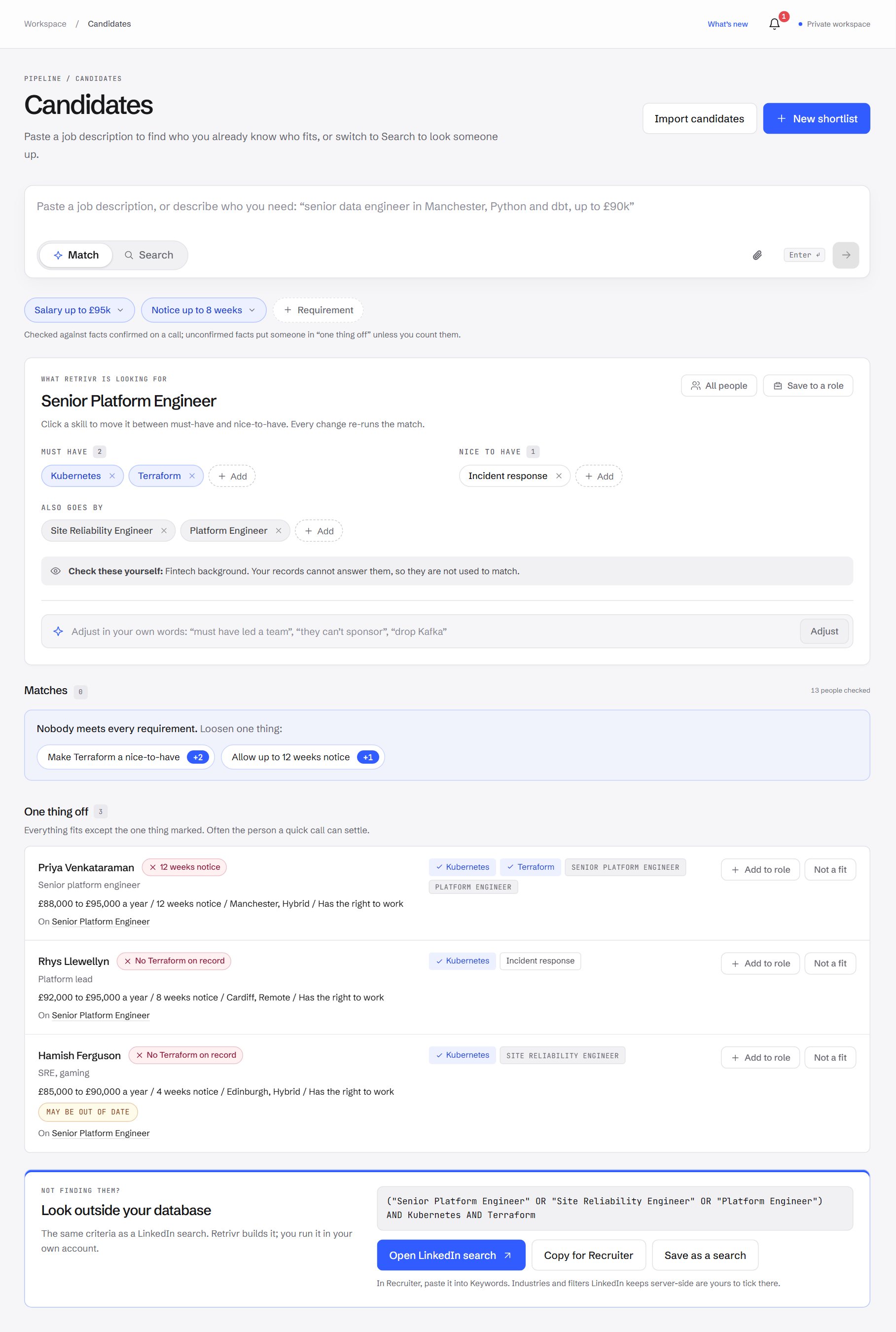
Shown with the fictional demo workspace.
The AI reads the brief. Plain rules do the ranking.
Words in, criteria out
The brief becomes must-haves, nice-to-haves, other titles and requirements such as salary, notice and location. Each is a chip you can change, remove or add to.
Ranked on what you know
People are matched on their headline, skills and notes, and on the salary, notice and right to work they confirmed on a screening call.
Unconfirmed is not a fit
If nobody confirmed a fact, it counts as a miss, marked as such, unless you choose to count unconfirmed as a fit for that requirement.
One thing off
When nobody fits every requirement, it lists the people missing exactly one, and says which, so you can decide what to loosen.
Check these yourself
What your records cannot answer, a degree or a sector, is listed for you to check rather than guessed.
Then look outside
The same criteria become a LinkedIn keyword search you open on a click, copy for Recruiter or keep as a saved search.
3 steps,
all of them yours.
- 1
Paste the brief
A full job description, a client’s email or a line you typed. Or start from one of your open roles.
- 2
Adjust the chips
Drop a must-have, add another spelling, set the budget. Every change re-ranks the list at once, and Back undoes it.
- 3
Add the right people to the role
Add to role puts them on the pipeline as sourced. Nothing is sent to anyone.
| Keyword search in your CRM | Instant Match | |
|---|---|---|
| What you type | Boolean strings | The brief as the client wrote it |
| Near misses | Not shown | Listed, with the one requirement they miss |
| Salary and notice | Free text, if anywhere | Facts the candidate confirmed on a call |
| Next step | Start again on LinkedIn | The same criteria as a LinkedIn search |