Email capture · Core
Your email threads, on the right record, without forwarding
Open a conversation in Gmail or Outlook on the web. If someone in it is a candidate or client contact you keep, the Retrivr extension saves the messages to them. A reply moves the candidate to Replied.
- Every plan
- Only known people
- No mailbox permission
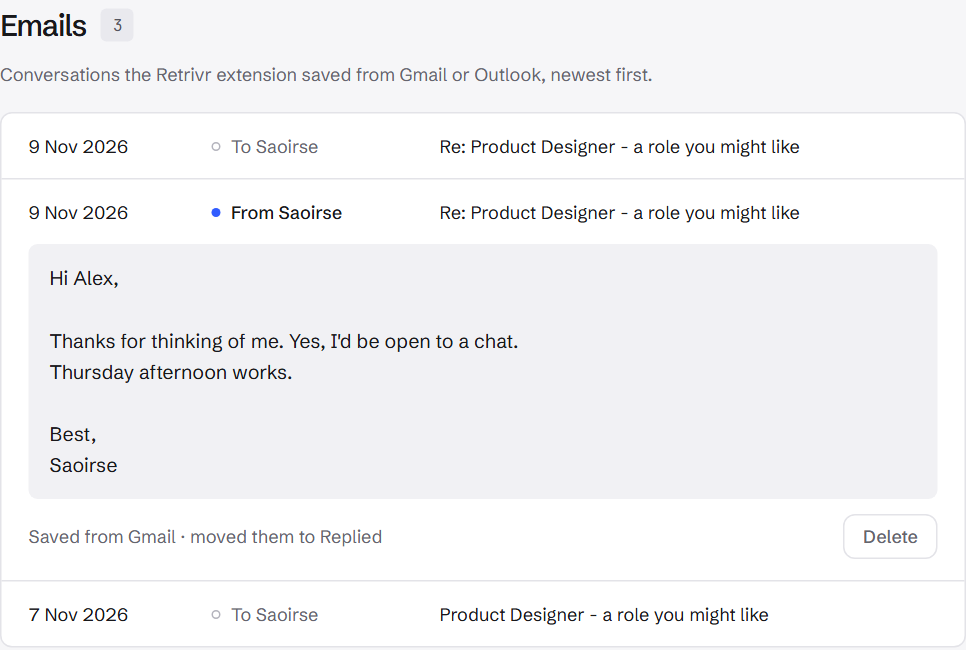
Shown with the fictional demo workspace.
Only the people you already know leave your inbox
Checked in your browser
Each address in the conversation is compared, in the browser, against a scrambled list of your people’s addresses. Nobody else’s message is sent anywhere.
One record per person
Each message is saved once per known person, without the quoted history.
Replies move the stage
A message from a contacted candidate moves them to Replied; nothing moves backwards.
Clients stay current
An email with a client contact updates their last contact, so they drop off Clients to chase.
A sidecar, not a mail client
No sending. Retrivr never sends, replies or writes into a compose window.
No mailbox access. It holds no Google or Microsoft permission; it reads only the conversation open on your screen.
Your switch. Turn automatic saving off in the extension at any time.
3 steps,
all of them yours.
- 1
Allow the mailboxes
One Chrome prompt, right after you connect the extension. Saying no is fine.
- 2
Read your email as usual
Matched conversations are saved when the panel is open, or the next time you open the extension.
- 3
See it on the record
Under Emails on the person’s or client’s page.